Back to all blogs
Learn what online proctoring is, how it works, its types and key features, plus where traditional proctoring falls short in modern remote hiring and assessments.
Abhishek Kaushik
May 18, 2026

Online proctoring has become a core part of how assessments are run today.
As hiring moved online, organizations needed a way to maintain integrity without controlling the environment. Proctoring filled that gap by bringing structure, oversight, and consistency to remote evaluations.
But the landscape hasn’t stayed the same.
Assessments are now happening at scale, across locations, devices, and time zones. At the same time, candidates have access to tools that can assist them in real time, often without leaving obvious traces.
This creates a new challenge.
In this guide, we’ll break down:
What online proctoring is and how it works
The different types of proctoring systems
Key features that enable monitoring and control
Where traditional approaches fall short today
And how evaluation is evolving beyond surface-level signals
If you’re using online proctoring, or thinking about it, this will help you understand not just what it does, but where it fits in a modern evaluation stack.
What is Online Proctoring?
Online proctoring is the process of monitoring and evaluating candidates during an online assessment or interview to ensure the integrity of the interview process.
At its core, it tries to answer a simple question: Is the person being evaluated actually doing the work on their own?
In a traditional setting, this role was handled by a human invigilator in a physical room. Online proctoring replaces that environment with a mix of technology and oversight by using webcams, screen monitoring, audio tracking, and behavioral signals to observe what’s happening remotely.
But that definition only scratches the surface.
Today, online proctoring is no longer limited to exams in classrooms or certification centers. It has expanded into remote hiring processes, where candidate fraud in hiring is becoming harder to detect.
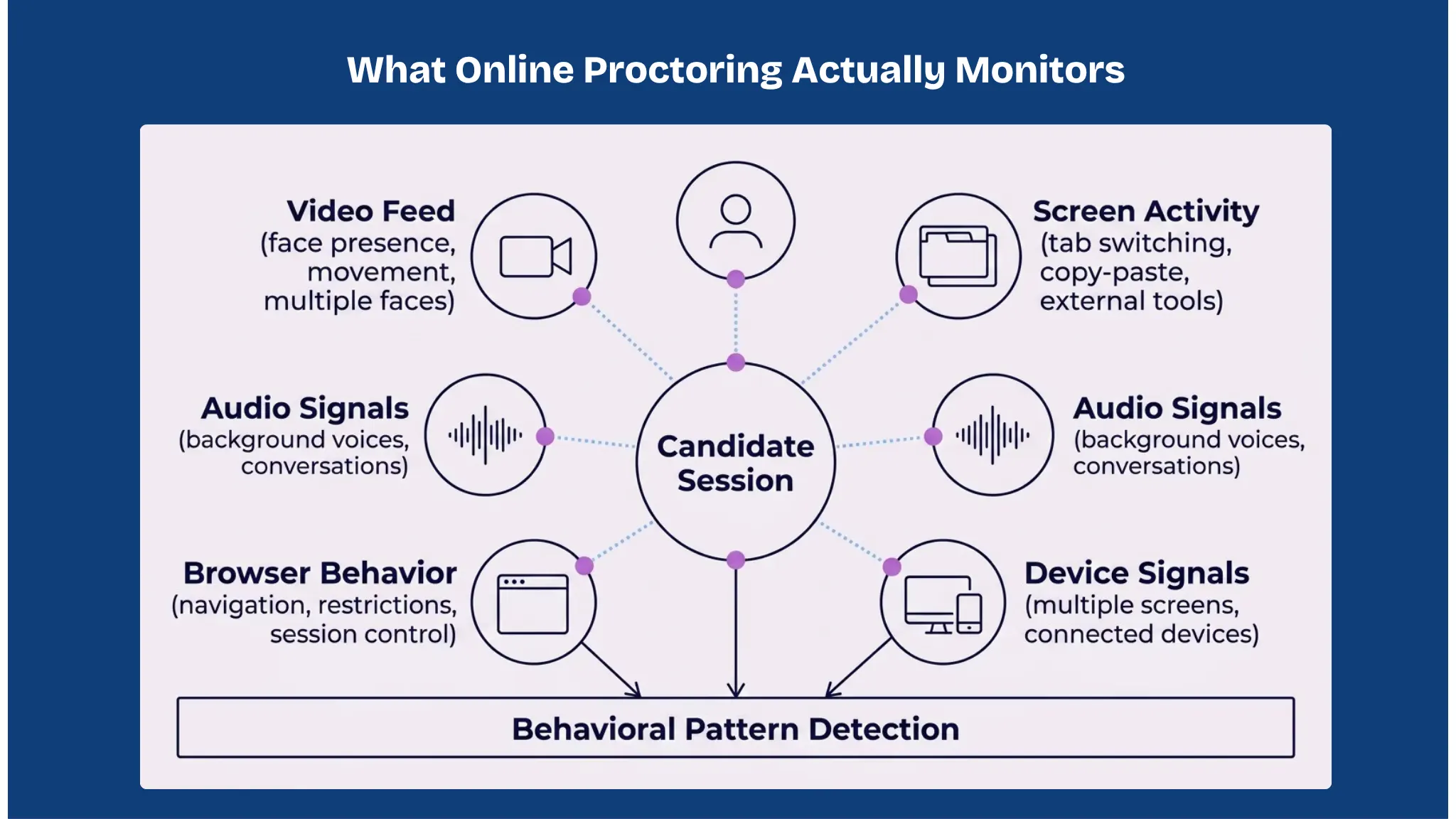
What actually gets monitored?
Depending on the setup, online proctoring systems can track multiple layers of activity during an assessment:
Video feed: to verify presence and detect suspicious behavior
Screen activity: to monitor tab switching, external tools, or copy-pasting
Audio input: to identify conversations or external assistance
Browser behavior: to restrict navigation or unauthorized access
Device signals: in some cases, detection of additional screens or devices
Instead of relying on a single signal, modern systems combine these inputs to build a more complete picture of candidate behavior.
From supervision to signal detection
One of the biggest shifts in online proctoring is how monitoring is approached.
Earlier systems focused on continuous supervision, essentially trying to replicate a human watching a candidate at all times.
Newer systems are moving toward signal-based detection, where:
Behavior is tracked continuously
Suspicious patterns are flagged automatically
Only relevant moments are reviewed
This shift matters because scale has changed.
When hundreds or thousands of candidates are being evaluated simultaneously, manual oversight alone doesn’t hold up.
Where online proctoring fits in
Online proctoring now sits at the intersection of three things:
Assessment integrity - ensuring results can be trusted
Scalability - evaluating large volumes without manual overhead
Remote access - enabling candidates to participate from anywhere
For organizations, it acts as a safeguard.
For candidates, it creates a structured environment, even outside a physical room.
Why Online Proctoring Matters Today
Online proctoring has become important because the environment around assessments have completely changed.
A few years ago, most evaluations happened in controlled settings such as classrooms, offices, test centers. The rules were clear, the environment was predictable, and supervision was straightforward.
That’s no longer the case.
Today, assessments happen anywhere, bedrooms, co-working spaces, cafés, across time zones. And that shift has introduced a new layer of complexity that traditional systems weren’t designed for.
The shift to remote evaluation
Hiring and assessments have moved online faster than most teams anticipated.
What used to be:
In-person interviews
On-site technical rounds
Controlled exam environments
Has now become:
Remote interviews across geographies
Asynchronous assessments
High-volume screening processes
This shift brought scale and accessibility.
But it also removed the one thing that made evaluation reliable: control over the environment.
Online proctoring stepped in to fill that gap.
The rise of AI-assisted cheating
Today, a candidate doesn’t need to prepare the same way they did before. They can:
Generate structured answers in seconds
Get real-time help during interviews
Use second devices without being noticed
Rely on AI tools that listen and respond instantly
This changes the nature of the problem.
It’s no longer about someone trying to look up an answer once or twice.
It’s about continuous external assistance throughout the evaluation.
And most traditional interview formats are not built to detect that.
👉 10 Ways to Prevent AI Cheating in Remote Interviews
The gap between performance and actual ability
As a result, a new kind of gap is emerging:
Candidates can sound highly competent
Without necessarily having the underlying depth
Polished answers are easier than ever.
But independent thinking, problem-solving, and real understanding haven’t changed.
This creates a risk for hiring teams, often resulting in bad hires due to AI interview cheating.
Strong interview performance doesn’t always translate to strong on-the-job performance
Decision-making becomes harder to trust
False positives increase
Online proctoring, when done right, helps reduce this gap by adding behavioral context to answers.
Scale is amplifying the problem
Another reason this matters now: volume.
Companies are no longer interviewing a handful of candidates. They’re evaluating:
Hundreds of applicants per role
Across multiple stages
Often simultaneously
At that scale:
Manual monitoring breaks down
Inconsistencies increase
Edge cases get missed
Without structured oversight, it becomes difficult to maintain fairness and integrity across all candidates.
Online proctoring introduces consistency, every candidate is evaluated under a similar set of rules and signals.
The cost of getting it wrong
A weak evaluation process impacts business outcomes.
When integrity breaks down:
Hiring decisions become unreliable
High-potential candidates get filtered out
Underqualified candidates move forward
Teams spend more time correcting bad hires
Over time, this compounds into:
Increased hiring costs
Lower team performance
Slower execution
Which is why proctoring is becoming part of the core evaluation infrastructure.
Types of Online Proctoring
Not all proctoring works the same way.
The approach you choose depends on what you’re trying to balance such as accuracy, scale, cost, and candidate experience.
Most systems fall into four broad categories. While they often get listed together, the differences between them are significant in practice.
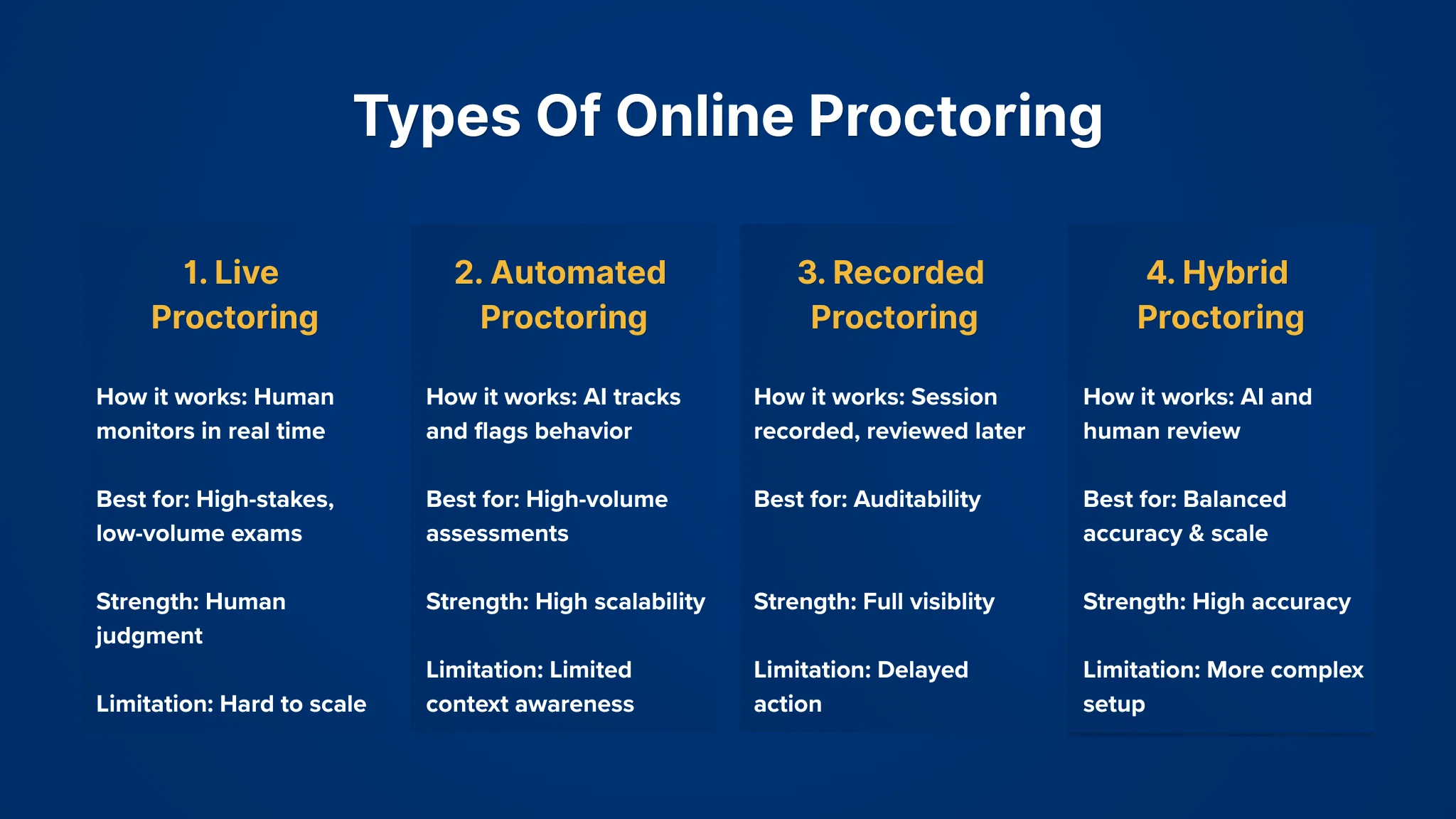
1. Live Proctoring
This is the closest equivalent to a traditional exam setting.
A human proctor monitors candidates in real time through video and audio feeds. They can intervene if something looks off, like ask the candidate to adjust their camera, pause the test, or flag the session.
Where it works well:
High-stakes exams
Certification tests
Low-volume, high-risk evaluations
What you get:
Direct human judgment
Immediate intervention when needed
Higher confidence in edge cases
Where it starts to break:
Doesn’t scale easily
Expensive to run across large volumes
Prone to inconsistency between different proctors
In hiring contexts, this approach is rarely used at scale. It slows things down and adds operational overhead.
2. Automated (AI) Proctoring
This is the most widely used model today, especially for large-scale assessments.
Instead of a human watching every session, the system tracks behavior and flags anything unusual. These flags are based on predefined signals, like tab switching, multiple faces on camera, or suspicious eye movement.
No one is actively monitoring in real time. Everything is recorded, analyzed, and scored.
Where it works well:
High-volume hiring assessments
Early-stage screening
Standardized tests
What you get:
Scalability across thousands of candidates
Consistent rule-based monitoring
Lower operational cost
Limitations to be aware of:
Context can be missed
False positives can happen
Doesn’t always capture more subtle forms of assistance
This is where most modern systems sit but the quality of detection varies a lot depending on how signals are interpreted.
3. Recorded Proctoring (Record & Review)
In this model, sessions are recorded in full, but not actively monitored during the test.
After the assessment, flagged segments are reviewed, either by a human or through additional analysis.
It sits somewhere between live and automated approaches.
Where it works well:
Medium-stakes assessments
Situations where auditability matters
When real-time intervention isn’t necessary
What you get:
Full session visibility
Flexibility in review
Less pressure on real-time infrastructure
Tradeoffs:
Issues are only caught after the fact
Review still requires manual effort
Slower turnaround for final decisions
This model is often used when organizations want a record of the session without committing to live monitoring.
4. Hybrid Proctoring
Hybrid setups combine elements of automated detection with human oversight.
For example:
AI flags suspicious behavior in real time
A human proctor reviews or intervenes only when needed
Or:
Automated monitoring runs throughout
Human review is triggered for high-risk sessions
Where it works well:
High-stakes hiring
Technical interviews
Scenarios where both scale and accuracy matter
What you get:
Better balance between efficiency and judgment
Reduced manual workload
Higher confidence in flagged cases
Challenges:
More complex to implement
Requires coordination between systems and reviewers
Costs can vary depending on how much human involvement is added
Choosing the right approach isn’t straightforward
There’s no single “best” type of proctoring. Each comes with tradeoffs.
In practice, teams often end up using a mix:
Automated systems for early-stage filtering
More controlled setups for later stages
The key is understanding what you’re optimizing for:
Speed
Accuracy
Cost
Candidate experience
Most of the problems with proctoring don’t come from the technology itself, they come from using the wrong approach for the wrong stage.
How Online Proctoring Works
From the outside, online proctoring can feel like a black box.
A candidate logs in, takes a test, and gets a result.
Behind the scenes, there’s a structured flow that most systems follow. The details vary by platform, but the core steps remain fairly consistent.
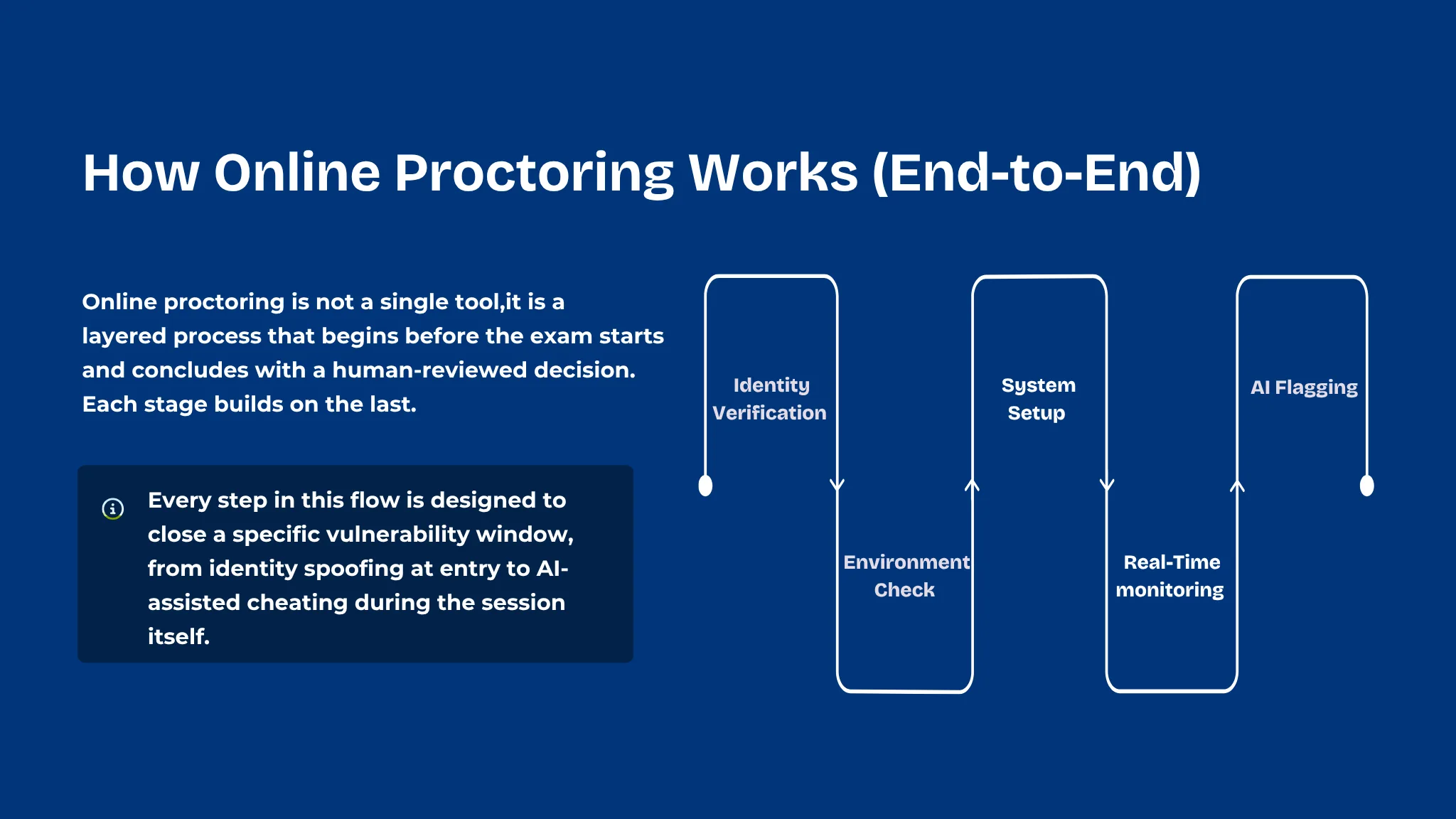
Step 1: Identity Verification
Before the assessment begins, the system needs to confirm that the right person is taking the test.
This usually involves a combination of:
Uploading a government-issued ID
Capturing a live photo through the webcam
Matching the live image with the ID
In some cases, verifying email, phone, or login credentials
Some systems also introduce liveness checks, simple actions like turning your head or blinking, to ensure it’s not a static image being used.
The goal here is straightforward: Make sure the candidate is who they claim to be.
Step 2: Environment Check
Once identity is confirmed, the system looks at the candidate’s surroundings.
This step is often quick, but it plays an important role.
Candidates may be asked to:
Turn their webcam to show the room
Adjust lighting or camera angle
Ensure their face is clearly visible
Remove any unauthorized materials from the desk
In more controlled setups, the system may also:
Check for additional screens
Verify that no other person is present
Ensure the workspace meets certain guidelines
This step sets the baseline for what’s considered a “clean” environment before the assessment starts.
Step 3: System & Browser Setup
Before the test begins, certain controls are put in place on the candidate’s device.
Depending on the platform, this can include:
Restricting access to other tabs or applications
Enabling a secure browser environment
Disabling copy-paste functions
Preventing screen sharing or recording
Some tools go further and monitor:
Running background applications
Connected devices
Network behavior
This layer is less visible to the candidate, but it’s critical.
It reduces the chances of obvious forms of external assistance.
Step 4: Real-Time Monitoring
Once the assessment starts, monitoring runs continuously in the background.
Multiple signals are tracked at the same time:
Video feed: facial presence, movement, multiple faces
Eye direction: frequent looking away from the screen
Audio: background voices or unusual sounds
Screen activity: tab switches, window changes
Keyboard and mouse patterns: unusual behavior
Individually, these signals don’t mean much.
But when combined, they start to form patterns.
For example:
Repeated tab switching + long pauses + off-screen glances
Consistent audio disturbances during key questions
These patterns are what the system pays attention to, often revealing behavioral signs of cheating during remote interviews
Step 5: Behavior Analysis & Flagging
This is where raw data turns into usable signals.
Instead of recording everything blindly, the system identifies moments that stand out. These are flagged based on predefined rules or behavioral models.
Common flags include:
Multiple faces detected
Candidate leaving the frame
Suspicious eye movement patterns
Attempts to switch tabs or minimize the window
Unexpected audio activity
Each flag is usually tagged with:
A timestamp
A short clip or snapshot
A severity level
Some systems also assign an overall credibility score based on how the session unfolded.
This makes it easier to quickly understand which sessions need attention.
Step 6: Review & Decision Making
After the assessment ends, the flagged data is reviewed.
Depending on the setup:
Fully automated systems generate reports directly
Hybrid systems route flagged sessions for human review
Live proctoring setups may already have notes from real-time monitoring
Reviewers don’t watch the entire session.
They focus only on the flagged segments, which saves time and keeps the process efficient.
Based on this:
The session may be cleared
Marked for further review
Or flagged as compromised
What actually matters in this process
While the steps look linear, the effectiveness of online proctoring depends on a few deeper factors:
Signal quality: Are you tracking meaningful behavior or just surface-level activity?
Context awareness: Can the system distinguish between suspicious and normal behavior?
Noise vs insight: Are you generating useful flags or overwhelming reviewers with false positives?
Two systems can follow the same steps and still produce very different outcomes.
At a high level, online proctoring is not just about watching candidates.
It’s about collecting signals, identifying patterns, and turning them into decisions.
Key Features of Online Proctoring Software
Not all proctoring tools are built the same. On paper, many of them list similar features but how those features are grouped and used makes a big difference.
Instead of looking at a flat list, it’s more useful to break features into layers based on what they actually do.
1. Identity & Authentication
This is the first layer, making sure the right person is taking the assessment.
Common features include:
ID verification: Candidates upload a government-issued ID which is matched against their live image
Facial recognition / face match: Compares the candidate’s face at the start (and sometimes throughout) with the initial capture
Liveness detection: Prompts simple actions (like blinking or head movement) to prevent spoofing
Login authentication: Email, OTP, or secure credentials to restrict access
If identity itself isn’t reliable, everything that follows becomes questionable. This layer sets the foundation for trust.
2. Environment & Presence Monitoring
Once identity is confirmed, the focus shifts to the candidate’s surroundings and presence.
Features here include:
Webcam monitoring: Continuous video feed to ensure the candidate remains visible
Multiple face detection: Flags if another person appears in the frame
Candidate absence detection: Detects when the candidate leaves the seat or moves out of view
Environment scan (pre-check): Room scan before the test begins
Lighting and visibility checks: Ensures the candidate is clearly visible throughout
A controlled environment reduces obvious risks, like someone else assisting off-camera or stepping in during the test.
3. Screen & Device Monitoring
This layer focuses on what’s happening on the candidate’s system.
Key features include:
Screen recording: Captures on-screen activity during the assessment
Tab switching detection: Flags when candidates move away from the test window
Application monitoring: Detects unauthorized apps running in the background
Copy-paste restrictions: Prevents content from being copied out or brought in
Multi-monitor detection: Identifies additional connected screens
A large portion of cheating attempts happen through the device itself, such as switching tabs, referencing material, or using external tools.
4. Browser & Access Controls
These are preventive features designed to limit what candidates can do during the test.
They include:
Secure / locked-down browser: Restricts navigation outside the test environment
Disable right-click, shortcuts, and extensions: Reduces ways to access external help
Full-screen enforcement: Prevents minimizing or hiding the test window
Session control: Blocks multiple logins or parallel sessions
Instead of detecting issues after they happen, this layer tries to prevent them from happening in the first place.
5. Audio & Behavioral Signals
This is where things move beyond basic monitoring into pattern detection.
Features include:
Audio monitoring: Detects voices, conversations, or unusual background noise
Eye movement tracking: Flags repeated off-screen glances
Head pose detection: Identifies frequent shifts in attention
Unusual interaction patterns: Long pauses, inconsistent typing, or erratic behavior
These signals don’t prove cheating on their own. But when combined, they help identify patterns that deserve attention.
6. AI-Based Detection & Flagging
This is the layer that ties everything together.
Instead of leaving raw data for manual review, the system highlights what actually matters.
Typical capabilities include:
Automated flagging of suspicious events
Timestamped clips for quick review
Severity levels for each flag
Session summaries or credibility scores
Some systems also:
Prioritize high-risk sessions
Reduce noise by filtering out low-signal events
Without this layer, proctoring becomes unmanageable at scale. With it, reviewers can focus only on the moments that matter.
7. Reporting & Insights
After the session, everything is compiled into a format that teams can act on.
This usually includes:
Detailed session reports
Flag summaries
Video snippets of suspicious activity
Audit logs for compliance
In hiring contexts, this may also tie into:
Candidate evaluation workflows
Decision-making dashboards
Data is only useful if it’s easy to interpret. Good reporting turns raw monitoring into clear signals.
Features alone don’t define effectiveness
Most tools will check off many of these features.
But in practice, what matters more is:
How accurately signals are captured
How well noise is filtered out
How easy it is to act on the output
A system with fewer, well-calibrated signals can outperform one that tracks everything but overwhelms you with irrelevant flags.
At a glance, online proctoring looks like a feature-heavy category.
In reality, it’s about how these features work together to create reliable, usable signals.
Where Online Proctoring Falls Short And What Comes Next
Most proctoring systems were built for a different problem.
They focus on what’s visible:
Is the candidate on camera?
Are they switching tabs?
Is someone else in the room?
That worked when cheating looked obvious.
But today, the problem has shifted.
Candidates don’t need to break rules anymore.
They can stay within the system and still get help.
AI tools generating answers in real time
Copilots running silently during interviews
Second devices sitting just outside the frame
From the outside, everything looks clean.
No tab switches. No visible violations. No interruptions.
And yet, the evaluation is compromised.
The real gap: surface signals vs actual thinking
Traditional proctoring is built on rule-based detection:
Trigger an alert when something “wrong” happens
Flag based on predefined conditions
But modern interview fraud doesn’t always trigger those rules.
It shows up differently:
Answers that are too structured, too consistent
Delays that don’t match the complexity of the question
Sudden jumps in clarity or articulation
These aren’t violations.
They’re patterns.
And most systems aren’t designed to read them.
What Sherlock AI actually does
Sherlock AI approaches this problem from a different angle.
Instead of just monitoring activity, it focuses on verifying authorship and reasoning in real time.
During an interview, Sherlock AI:
Joins the session automatically through calendar integrations
Observes the interaction using video, audio, and behavioral signals
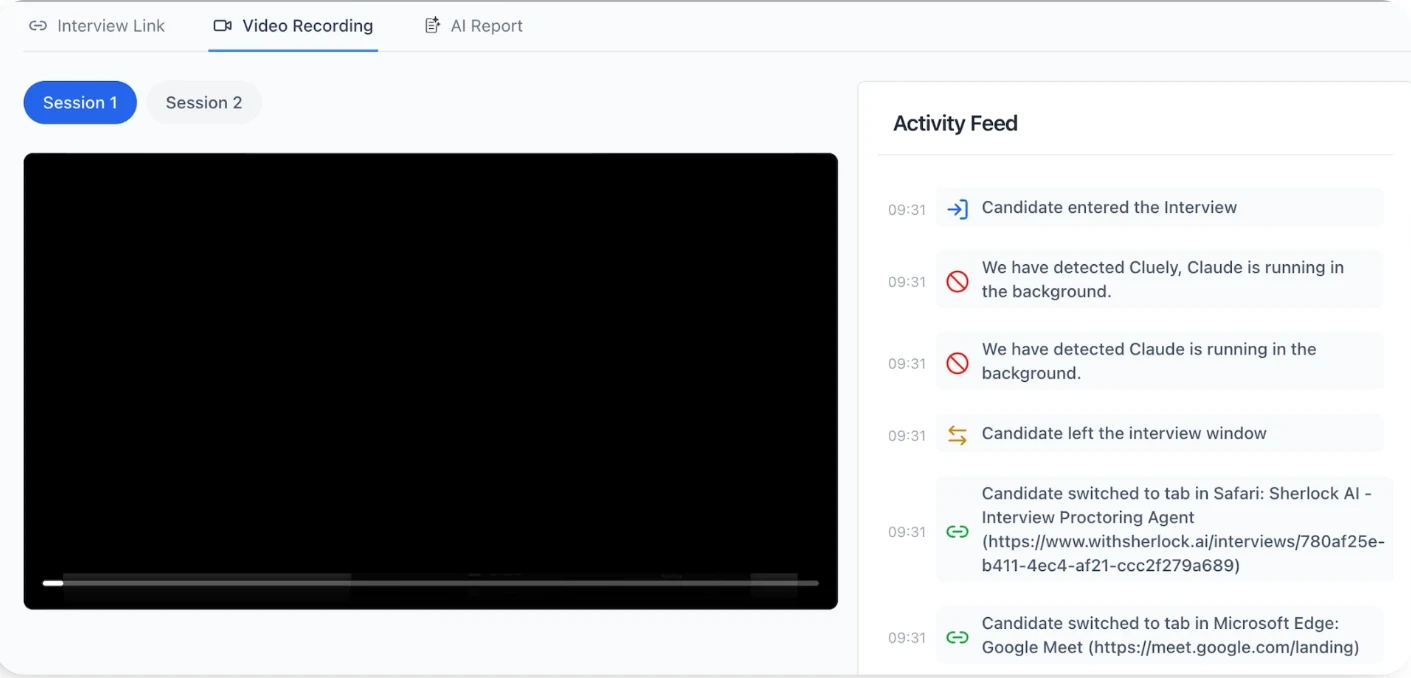
Detects signs of AI assistance or external help as the conversation unfolds
Sends real-time alerts so interviewers don’t have to second-guess what they’re seeing
It’s active analysis, running alongside the interview without disrupting it.
From rule-based flags to behavioral models
One of the key differences is how detection works.
Most systems rely on rules.
Sherlock AI uses a multimodal approach:
Combines device activity, audio environment, and behavior
Models what “natural interaction” looks like
Identifies when behavior has been subtly engineered
Instead of asking:
“Did something suspicious happen?”
It asks:
“Does this look like genuine thinking?”
That shift matters because the hardest cases to detect are the ones that look normal on the surface.
Built for how interviews actually run today
Sherlock AI fits into real workflows:
Works with tools like Zoom, Google Meet, and Teams
Integrates with calendars and interview schedules
Runs in the background while interviews happen normally
Interviewers don’t have to change how they evaluate candidates.
They just get better visibility into what’s actually happening.
Beyond cheating: understanding how candidates use AI
There’s another shift happening.
Some teams don’t want to block AI entirely. They want to understand how candidates use it.
Sherlock AI supports that too.
Tracks AI usage patterns during interviews
Evaluates how effectively candidates use tools
Helps teams distinguish between assistance and actual capability
So the conversation moves from: “Was this allowed?” to “Was this meaningful?”
What this changes for hiring teams
When you move beyond surface monitoring, a few things become clearer:
Which candidates are genuinely strong
Which performances don’t fully hold up
Where deeper evaluation is needed
Instead of relying only on answers, teams get context behind those answers.
And that’s what’s been missing.
Read more: How Sherlock AI Stops Invisible Interview Cheating
Conclusion
Online proctoring started as a way to replicate in-person supervision. Monitor the candidate, control the environment, flag obvious issues.
And for a while, that worked.
But as assessments moved online and candidate behavior evolved, the limits of that approach became clearer.
Today, proctoring still plays an important role:
It helps establish baseline integrity
It brings consistency to remote evaluations
It enables assessments at scale
But it’s no longer sufficient on its own.
Because most modern risks don’t look like traditional cheating. They don’t trigger clear violations or visible disruptions.
They show up in more subtle ways such as how answers are formed, how consistently someone performs, and whether that performance reflects real understanding.
Online proctoring is still a critical piece of the stack. But as interviews and assessments evolve, it needs to be complemented by systems that go deeper.
That’s where solutions like Sherlock AI come in, extending beyond surface-level monitoring to help teams understand not just what happened during an evaluation, but how it happened.
Because in the end, the goal isn’t just to run assessments. It’s to trust the decisions that come out of them.