Back to all blogs
Learn how to detect AI coding assistants during technical interviews using behavior analysis, proctoring strategies, and Sherlock AI for fair hiring decisions.

Abhishek Kaushik
Feb 6, 2026
Remote technical interviews have transformed how companies hire engineers. While they offer speed and global reach, they also introduce a new and growing risk. Candidates can now rely on hidden AI tools to generate code, debug errors, and craft optimal solutions in real time during interviews.
This shift changes what interview performance actually represents. Strong results no longer guarantee strong skills. For hiring teams, the challenge is no longer just evaluating problem solving ability. It is identifying when that ability is being artificially enhanced.
Independent reports suggest that as many as 27% of technical candidates admit to using AI during interviews, and in larger hiring studies, more than 50% of employers have observed widespread use of AI tools to solve coding challenges.
This blog explains how AI assistance is used in coding interviews, why it is difficult to detect, and how organizations can reliably identify AI assisted interview behavior using modern detection strategies and platforms like Sherlock AI.
What Is AI Assistance in Coding Interviews
AI assistance in coding interviews refers to the use of real time artificial intelligence tools that help candidates solve technical problems during live interviews without the interviewer’s knowledge.
These tools go far beyond simple reference material. They actively participate in the interview by generating logic, writing full solutions, and suggesting optimized approaches.
What Counts as AI Assistance
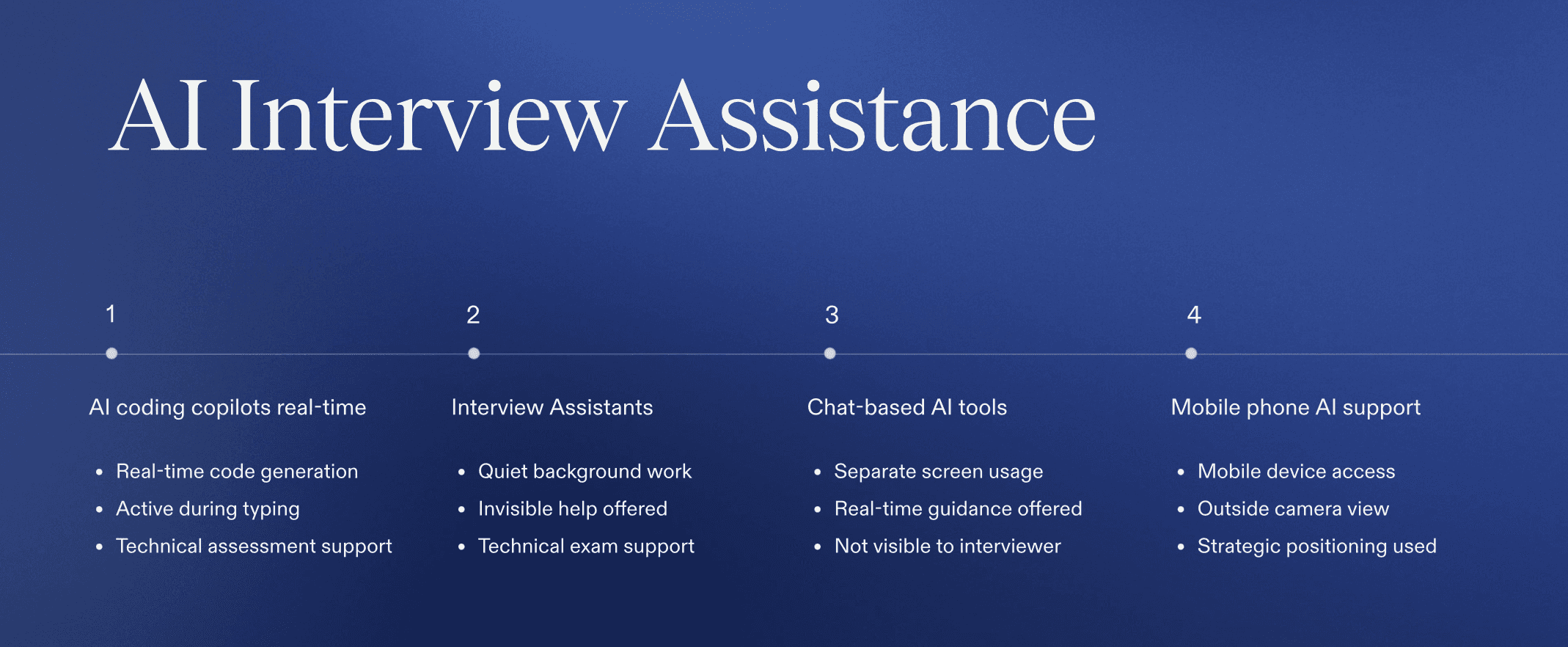
Common forms of AI assistance include:
AI coding copilots that generate code as the candidate types
Browser based interview assistants that run silently in the background
Chat based AI tools used on secondary screens or devices
Mobile phone based AI support hidden off camera
Unlike traditional cheating, AI assistance adapts dynamically to the interviewer’s questions, making it much harder to detect.
How AI Coding Assistants Work in Technical Interviews
Modern AI coding assistants are designed to be fast, discreet, and context aware.
Candidates typically paste the problem statement or verbally relay it to an AI tool. Within seconds, the AI generates a complete solution, often including edge cases and optimal time complexity. The candidate then types or reads the output as if it were their own reasoning.
Because these tools run locally, in browsers, or on separate devices, they rarely appear in screen shares or application logs. This makes AI assistance difficult to identify using traditional monitoring methods.
How Recruiters Can Detect AI Coding Assistants During Technical Interviews
Below are practical, behavior based methods recruiters can use to identify AI assisted activity during live technical interviews. Each point includes a brief explanation and a real interview example.
1. Ask for Step by Step Verbal Reasoning
Requiring candidates to explain their approach out loud reveals how they think and whether the solution is genuinely theirs.
Example: The candidate pauses for an extended time and then delivers a complete solution but struggles to explain how they arrived at it.
2. Change Constraints Midway Through the Problem
Real engineers adapt incrementally, while AI assisted responses often reset completely.
Example: When asked to optimize for memory, the candidate hesitates and replaces the entire solution instead of modifying existing logic.
3. Request Alternative Approaches
Understanding tradeoffs requires real experience, which AI assisted candidates often lack.
Example: The candidate can produce one solution but cannot explain a simpler or less efficient alternative.
4. Probe the Reasoning Behind Key Decisions
AI generated code may be correct, but the candidate may not understand why choices were made.
Example: When asked why a specific data structure was used, the candidate gives a generic answer without context.
5. Observe Response Timing Patterns
AI usage often creates noticeable delays followed by rapid, polished responses.
Example: The candidate remains silent after a question, then quickly writes a complete and optimized solution.
6. Watch for Inconsistent Confidence Levels
Discrepancies between coding speed and explanation clarity can signal external assistance.
Example: The candidate codes confidently but hesitates when asked to explain edge cases.
7. Evaluate Signals Together, Not in Isolation
Single indicators are inconclusive, but patterns across behaviors are meaningful.
Example: Repeated pauses, shallow explanations, and sudden optimized answers occur throughout the interview.
This approach helps recruiters focus on observable behavior and reasoning, making AI assistance easier to detect even when no tools are visibly present.
How Are AI Coding Copilots and Interview Assistants Invisible?
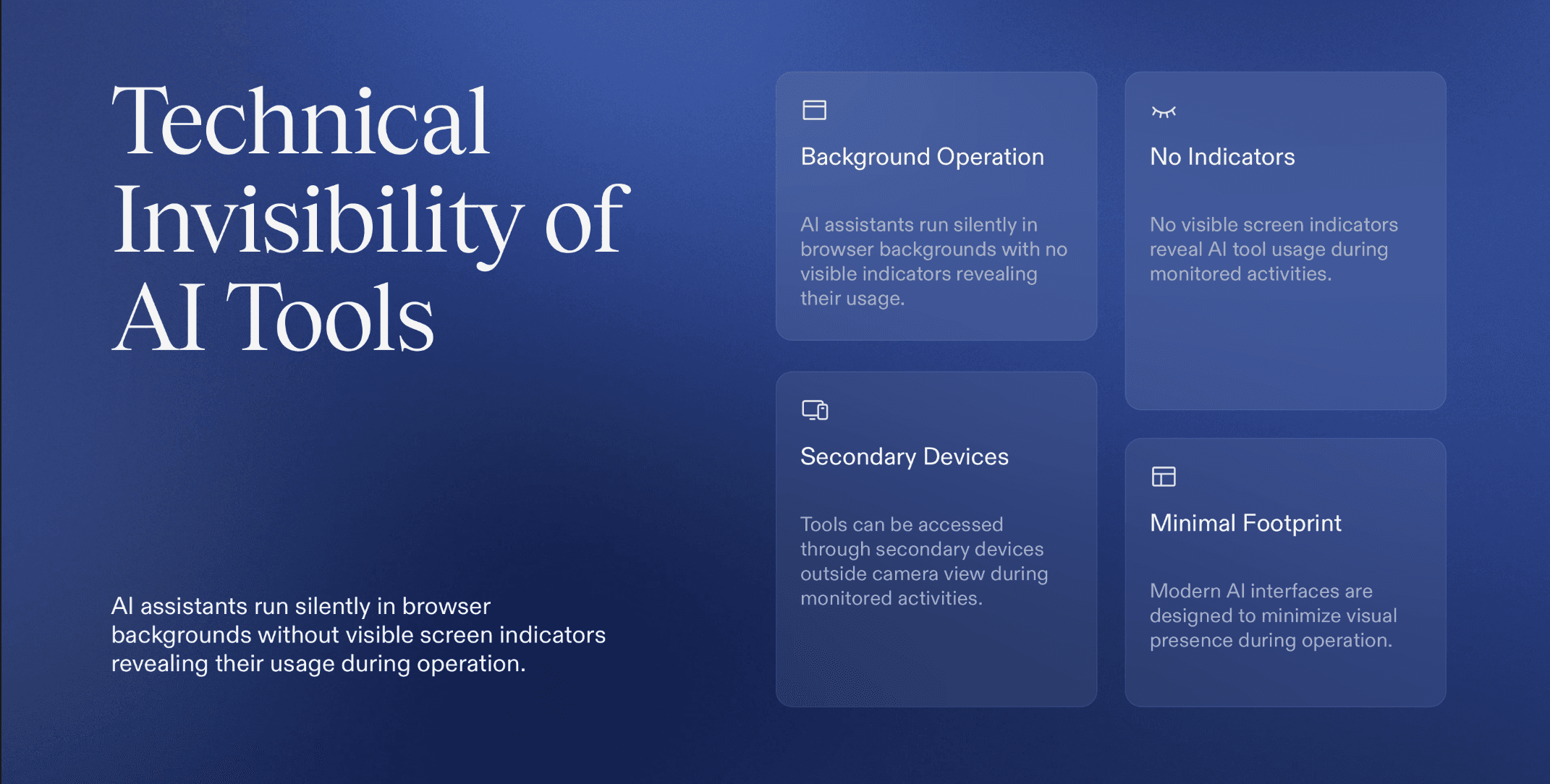
AI coding copilots and interview assistants are designed to operate in ways that are not immediately visible to recruiters or interviewers. Their invisibility comes from a combination of technical and behavioral factors:
AI tools run in the background or browser without being visible on screen.
Candidates can use phones or tablets outside the camera view.
AI generates complete, optimized solutions almost instantly.
AI adapts to new constraints or follow-up questions in real time.
AI solutions often show no trial and error or partial coding attempts.
How to Use Proctoring Software to Block and Detect AI Coding Copilots
Proctoring software is a critical control layer in modern technical interviews. When configured correctly, it helps organizations reduce access to AI coding copilots and identify suspicious behavior that traditional interviews often miss. Below is a deeper explanation of how each capability contributes to AI detection.
1. Block All Applications or Allow Only Approved Ones
Application level control restricts the candidate’s system to only the tools required for the interview, such as the IDE and browser being used. This prevents background AI copilots, browser extensions, and hidden applications from operating during the session.
How it helps recruiters: By locking down the environment, recruiters reduce reliance on trust and limit the opportunity for silent AI assistance that does not appear on screen.
2. Detect Cell Phones and Secondary Devices
Many AI assisted candidates use mobile phones or tablets positioned outside the camera frame to access AI tools. Proctoring software can detect the presence of secondary devices through camera based monitoring and behavior analysis.
How it helps recruiters: Identifying repeated downward glances, hand movement, or device reflections helps uncover AI usage that bypasses desktop restrictions.
3. Monitor From All Angles
Multi angle camera monitoring provides a more complete view of candidate behavior, including eye movement, posture changes, and off screen interactions. These behavioral signals often correlate with external assistance.
How it helps recruiters: Recruiters gain visibility into subtle patterns that indicate the candidate is referencing information outside the interview environment.
4. Scan the Room and Verify Candidate Identity
Pre interview room scans ensure no unauthorized screens, notes, or devices are present. Identity verification confirms the candidate is the same person throughout the interview.
How it helps recruiters: This prevents proxy interviews and ensures that the individual being evaluated is the one actually performing the work.
5. Combine Proctoring Signals With Behavioral Analysis
Proctoring is most effective when combined with behavioral signals such as response timing, explanation depth, and interaction patterns.
How it helps recruiters: Rather than relying on a single violation, recruiters can identify consistent patterns that suggest AI assisted behavior.
Read more: How Proctoring Platforms Detect and Prevent Cheating
Why Traditional Detection Methods Fall Short
The table below summarizes the limitations of common interview detection approaches and the unmet requirements created by AI assisted interviews.
Detection Approach | What It Can Do | Where It Fails Against AI Assistance |
|---|---|---|
Interviewer Judgment | Evaluates answers and communication | Cannot reliably distinguish AI generated reasoning from genuine expertise |
Screen Sharing | Shows visible applications | AI tools run in background apps, extensions, or separate devices |
Basic Proctoring | Enforces rules and environment controls | Focuses on violations, not behavior patterns |
Application Blocking | Limits known software | Fails when AI is accessed via mobile devices or browsers |
Code Output Review | Checks correctness of solutions | AI generated code is often correct and optimized |
Single Signal Flags | Detects isolated anomalies | Individual signals are inconclusive without context |
How Sherlock AI Detects AI Assistance in Coding Interviews
Sherlock AI is purpose built to identify AI assisted behavior that traditional proctoring and interviewer judgment often miss. Instead of focusing only on blocking tools or catching rule violations, Sherlock AI evaluates how candidates think, respond, and interact throughout the interview.
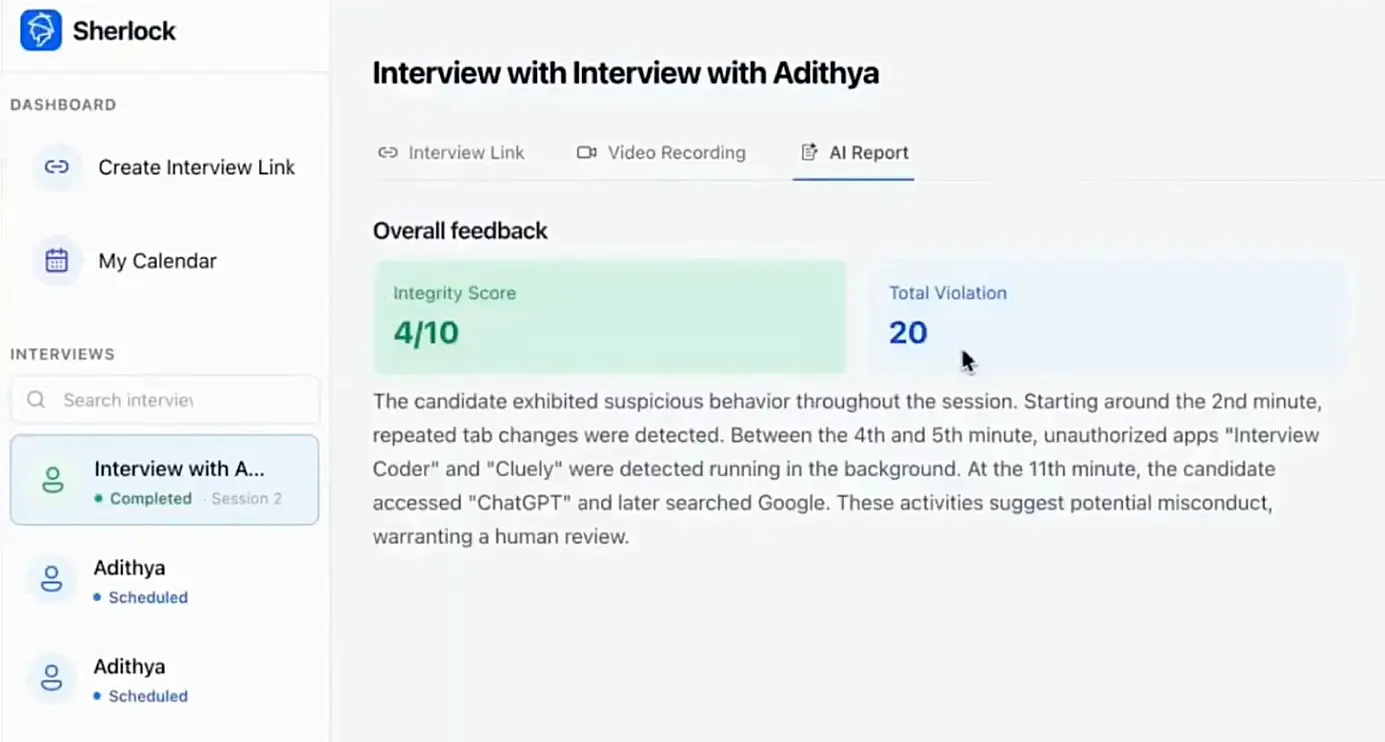
This behavior first approach allows detection even when AI tools are hidden, running off screen, or used on secondary devices.
1. Behavioral Pattern Analysis During Problem Solving
Sherlock AI analyzes how candidates approach problems from start to finish. Genuine problem solvers show gradual reasoning, exploration, and correction. AI assisted candidates often show abrupt jumps from uncertainty to complete solutions.
This analysis helps identify unnatural problem solving patterns that do not align with human cognitive flow.
2. Detection of Unnatural Response Structure and Timing
AI generated responses tend to be well structured but inconsistently timed. Sherlock AI tracks pauses, response latency, and delivery patterns to detect delays followed by unusually polished answers.
These timing anomalies are strong indicators of external assistance when observed repeatedly.
3. Cross Analysis of Video, Audio, and Interaction Signals
Rather than relying on a single signal, Sherlock AI correlates multiple inputs during the interview. Video cues such as eye movement and posture are analyzed alongside audio patterns like hesitation and pacing, as well as interaction data such as typing behavior.
This cross signal analysis reduces false positives and increases detection accuracy.
4. Identification of AI Generated Reasoning Patterns
AI tools often produce explanations that sound correct but lack personal context or experiential insight. Sherlock AI identifies reasoning that is overly generic, consistently optimal, or detached from the candidate’s demonstrated understanding.
This helps distinguish between genuine expertise and AI assisted articulation.
5. Continuous Risk Scoring Throughout the Interview
Sherlock AI evaluates candidate behavior continuously instead of relying on a single moment. Signals are aggregated into a risk profile that evolves as the interview progresses.
Recruiters receive a clearer picture of whether AI assistance influenced performance, rather than isolated alerts.
6. Actionable Insights for Recruiters
Instead of raw footage or vague flags, Sherlock AI provides structured insights that recruiters can review quickly. These insights highlight where and why suspicious behavior occurred, supporting fair and defensible hiring decisions.
By focusing on behavior rather than tools, Sherlock AI makes invisible AI assistance visible and measurable, restoring confidence in technical interview outcomes.
Final Thoughts
AI assistance has redefined what technical interviews measure. Strong interview performance no longer guarantees strong engineering skills when candidates can rely on hidden, real time AI support. For recruiters and hiring teams, the challenge has shifted from evaluating answers to validating genuine problem solving ability.
Traditional methods such as screen sharing, basic proctoring, and interviewer intuition were not built to detect invisible AI assistance. While they remain useful, they are no longer sufficient on their own. Accurate detection now requires understanding candidate behavior, reasoning patterns, and response dynamics throughout the interview.
Sherlock AI addresses this gap by focusing on how candidates think, respond, and interact in real time. By analyzing behavioral signals across video, audio, and interaction data, Sherlock AI helps organizations identify AI assisted interview behavior even when no tools are visibly present.
As AI continues to evolve, technical hiring must evolve with it. With behavior based detection and platforms like Sherlock AI, organizations can protect hiring integrity, make fairer decisions, and confidently evaluate real engineering skills.